Table of contents
Building MPE-enabled instruments
What is MPE?
MIDI Polyphonic Expression (“MPE”) is a powerful specification built atop the standard MIDI 1.0 protocol. MPE lets developers create highly expressive digital instruments that can go beyond what can be done with standard MIDI.
With MPE, each played note in a chord can be individually modulated by its own continuous control (CC) messages like pitch, aftertouch, “key/string position” or other parameters. This lets the digital instrument behave more like an acoustic instrument such as a guitar or violin in which a player has control over each individual string.
This is in contrast to standard MIDI, in which pitch modulation, aftertouch and other CC parameters affect all played notes (i.e., using the pitch wheel changes the pitch of every note in a chord).
How MPE works
MPE works by assigning each played note to its own MIDI channel. The MIDI specification includes 16 channels. One of these channels (either channel 0 or 15) is reserved as a “master” MPE channel for sending global messages like program changes, overall volume, modulation wheel, or sustain pedal. The remaining channels are available for triggering and controlling individual notes. This means that an MPE-enabled instrument can support up to 15 simultaneous note events and your instrument acts like 15 monosynths with each synth assigned to its own channel.
One important thing to keep in mind is that for MPE to work properly, the hardware controller (or DAW) and the instrument itself must at least have the same subset of MPE.
Another important concept to understand is that the MPE hardware controller (or DAW) is responsible for assigning your played notes to available channels and also for freeing up allocated channels when a note is released. The MPE instrument simply receives note data and generates sounds as requested by the controller (or DAW). It does not “keep track” of incoming notes; it simply responds to requests.
Using MPE in Gorilla Engine
The Gorilla Engine SDK includes an example project called “Poly Expression” that makes use of MPE. You can find it in the examples folder:
Gorilla Engine SDK > Examples > Script Examples > Poly Expression.inst
In this example:
- The X-Axis of your MPE controller is mapped to pitch.
- The Y-Axis of the MPE controller is mapped to key position (timbre)
- The Z-Axis of the MPE controller is mapped to aftertouch
The important thing is to set up the following three modulations: Pitch bend, aftertouch and CC-74 (the X, Y, and Z dimensions) so that each note receives the modulation data on its own channel. If you do this, it will work on MPE-enabled controllers from companies like ROLI, Expressive E, Keith McMillen Instruments and others.
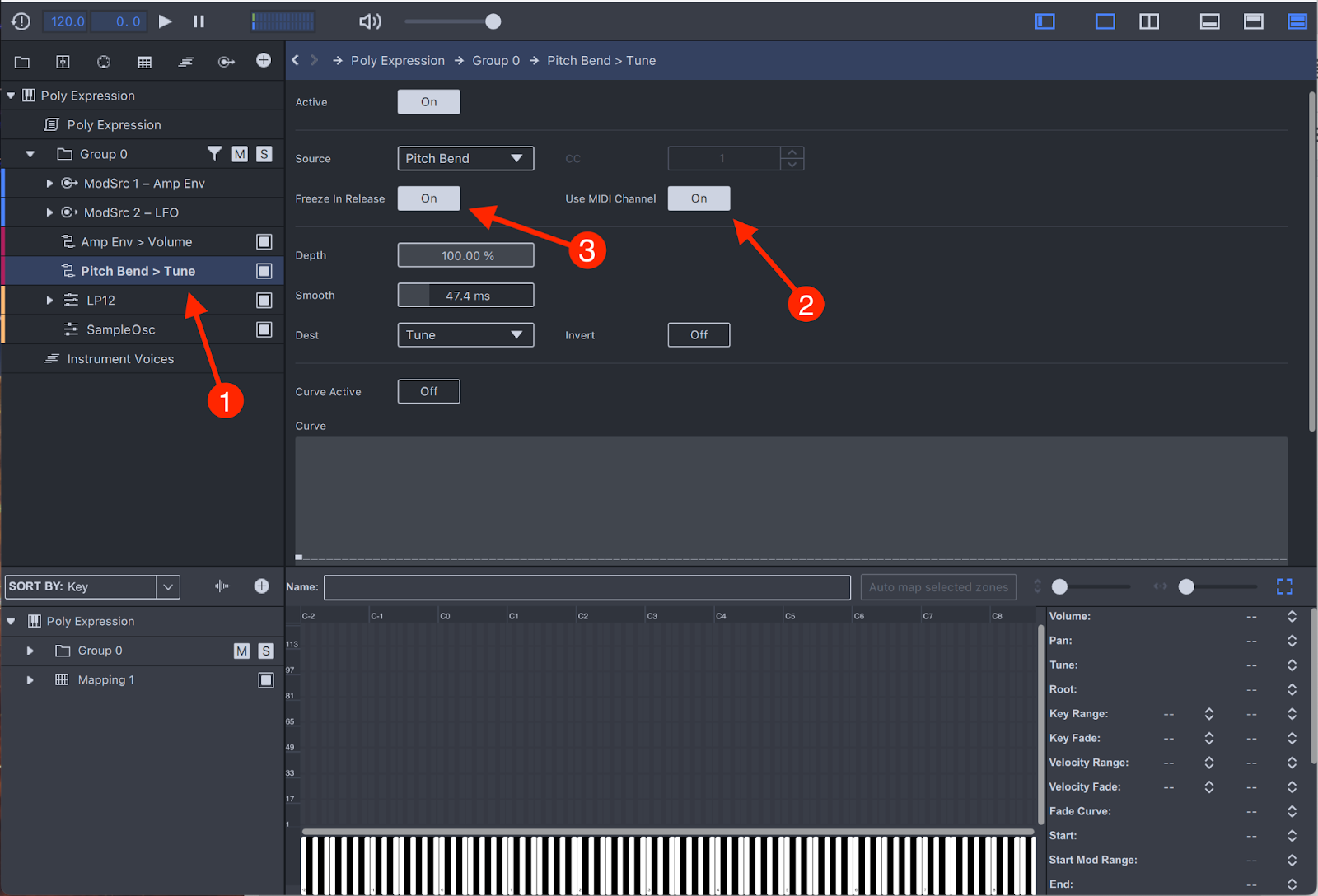
- Make sure that “User MIDI Channel” (found in the Mod Routing tab) is switched on for Pitch Bend and CC74.
- If a note is triggered on channel 3 and, moments later, CC information comes regarding channel 3, then that information is applied to channel 3. Incoming data for other channels is ignored by the active note on channel 3.
- Finally, the MPE specification states that notes should not respond to axis controllers after a note-off message is received so that the channel can be reused for a new note. To do this, ensure that “Freeze in Place” is switched on. This setting freezes the current value of the modulation routing when the note is released.
Regarding RPN configuring zones: Gorilla Engine receives these RPN messages and lets you implement them as you want, but the SDK itself does not deal with RPNs automatically. It is up to you as the developer how (and if) you would like to interpret these messages.
When compiling your instrument
When you’re compiling your instrument with Gorilla Compiler, please make sure to check the “Report MPE Behavior to DAW” option in the Plugin Settings tab.
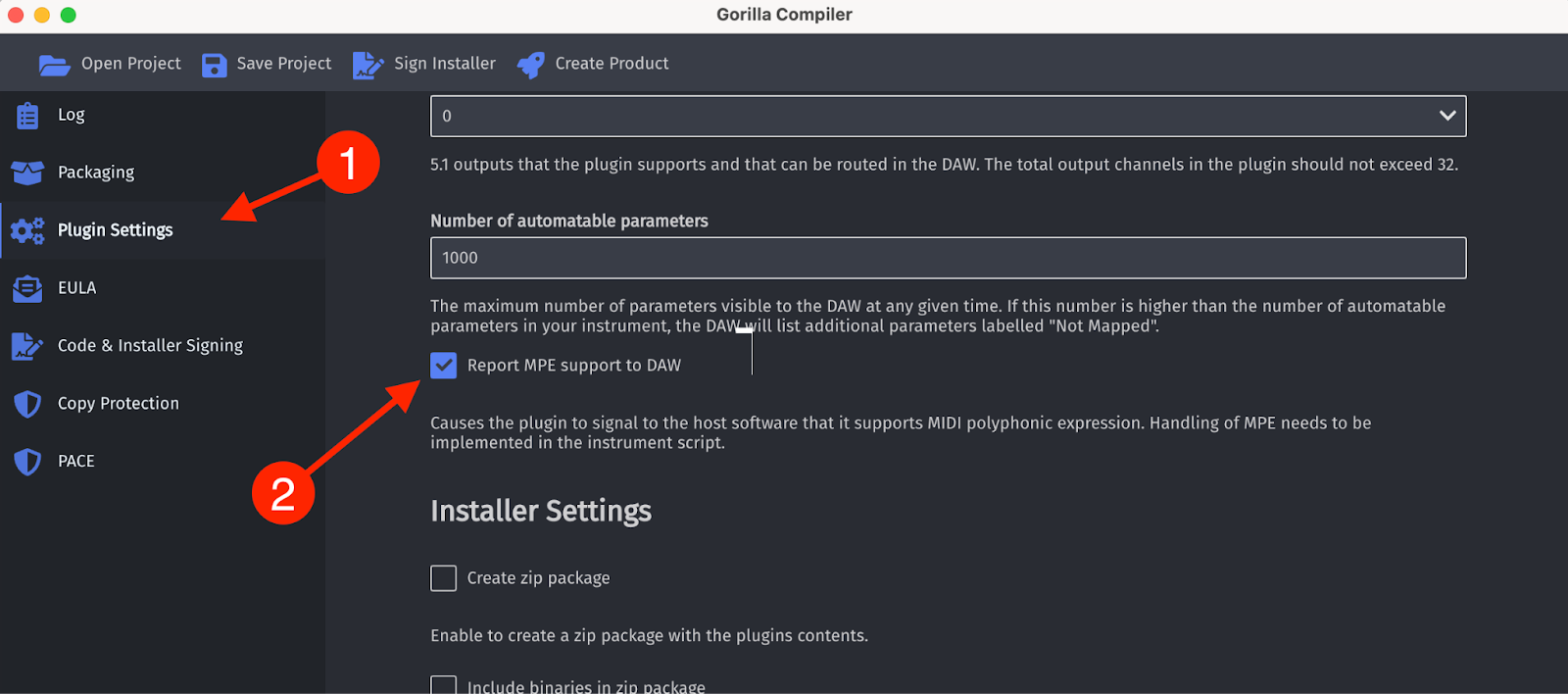
This sets a flag in the plugin that lets the host know that it is an MPE-enabled plugin. This is not always used by every DAW, but for example, Ableton Live displays an MPE logo and note info is displayed on separate channels (for example, each note has its own pitch bend).
For more information
To read more about MPE, please refer to MPE Specification 1.1 on MIDI.org (you must set up an account to access this but it’s free).